National Geographic for Windows 8 reached a milestone today... Its not even a month since it was launched, it has already crossed 10k downloads. A serious bug has caused its ratings to go down but we hope people will like the update that we have added. Hope to see more downloads in the coming month. Thank you all for enjoying this app so far. If you find any bugs or have any suggestions please email us to silverspots@outlook.com
Tuesday, December 18, 2012
National Geographic for windows 8: Update available
A new update is available for National Geographic for windows 8. Some interesting bugs are fixed. :) We will soon be launching exciting features to it. till then sorry for the inconvenience caused. Keep rating it good. :)
National Geographic for Windows 8: Launch
Happy to launch the new app dedicated for National Geographic lovers. Get all the news, photos and videos from National Geographic.
The killer features include,
- View latest news from National Geographic.
- View the picture of the day
- Set the picture as lock screen background.
- Check out the videos from National Geographic.
- view them with in the app.
Sunday, December 2, 2012
Set your image as lock screen background in Windows 8
Ever wondered how many times we change our wallpapers?? Well I change it everyday! With Windows 8 you can change your lock screen background too. And I can change it everyday because of my App called as National Geographic for Windows 8. And this is how I did it in xaml,
this code snippet would set an image from a uri and display a friendly message to the user.
you will have to include
using Windows.Storage.Streams;
using Windows.System.UserProfile;
to use the LockScreen class. LockScreen.SetImageFileAsync accepts a StorageFile object that contains a new image for the lock screen.
Now you can create an app on your own or download my app and get beautiful wallpapers and lock screen backgrounds everyday! Happy Coding!
StorageFile file = await StorageFile.CreateStreamedFileFromUriAsync(URI), new Uri(URI),
RandomAccessStreamReference.CreateFromUri(new Uri(URI)));
await LockScreen.SetImageFileAsync(file);
MessageDialog md = new MessageDialog("This image is set as your lock screen background", "Hurray");
var result = await md.ShowAsync();
this code snippet would set an image from a uri and display a friendly message to the user.
you will have to include
using Windows.Storage.Streams;
using Windows.System.UserProfile;
to use the LockScreen class. LockScreen.SetImageFileAsync accepts a StorageFile object that contains a new image for the lock screen.
Now you can create an app on your own or download my app and get beautiful wallpapers and lock screen backgrounds everyday! Happy Coding!
Saturday, December 1, 2012
To embed Youtube videos in Windows 8 xaml
I was making my 5th windows 8 application called National Geographic
for Windows 8. The best part of the channel’s info lies in videos and all the major
videos are uploaded on YouTube. Though
YouTube exposes all the videos through its feeds, its difficult to embed their
video in xaml. Mainly because xaml does not support Flash. Now YouTube supports
HTML 5 videos but I was not able to find many such videos. So I thought of
going ahead with Flash players in xaml. The trick lied in embedding the player
in an Iframe in a WebView.
This is the code snippet,
str = string.Format(@"<iframe width='{0}' height='{1}' src='{2}' frameborder='{3}'></iframe>", videoView.ActualWidth - 10, videoView.ActualHeight - 10, link, 0);
videoView.NavigateToString(str);
where "link" is my YouTube video url and "videoView" is my WebView control in the xaml like this<Grid Style="{StaticResource LayoutRootStyle}">
<WebView x:Name="videoView" Grid.Row="2" Margin="120,0,10,90"/>
</Grid>
I just did a bit of styling and here is the output,
Monday, August 27, 2012
Things that I hate in Nokia Lumia 800..
Ever since I got Nokia Lumia 800 I have not stopped
admiring it for its cut finishing and smooth touch response. But there are few
things that I totally hate. No matter how hard I try I still cannot forget the
facts that few things are so complex , rather just not there!
I am a person who loves to change the ringtone
everytime a new song is released. But that was until I got Lumia. This phone
does not allow the user to set their songs as ringtone. I cannot say that it
does not allow completely as we can set the ringtone through Zune.
Steps to set ringtone in Lumia 800,
1. Start
your PC and plug your phone.
2. Start
Zune and search for you song.
3. Change
its genre to ringtone.
4. Go
back to your phones settings and search for your song.
5. If
you find it there then you are lucky and can set it as ringtone.
6. If
not then you have to “understand” that the song which you have selected must
have been greater than 1 mb. Argh!!!
Steps to set ringtone in any other phone
1. Search
your favourite song and go to options
2. Set
as ringtone!!!
Oh I miss my old phone for this simplicity!! On top of
it I thought of ending this problem and creating my own application that would
simply set the ringtone without going to zune….To my surprise the classes are
not exposed, the music file is not exposed!!!!! Why on earth did Microsoft do
this!
Another thing that I really hate is not being able to
use mobile tethering or sharing the internet connection with other devices.
After a lot of searches on forums I found that it is not a windows phone 7
problem as its not available only in Nokia Lumia 800!!
These are few moments when I hate myself for buying
this phone. I am otherwise a Microsoft fan and a pro Microsoft person but few
things like these makes me crazy.
Saturday, March 10, 2012
Our first WP7 application-PicLabs is live!
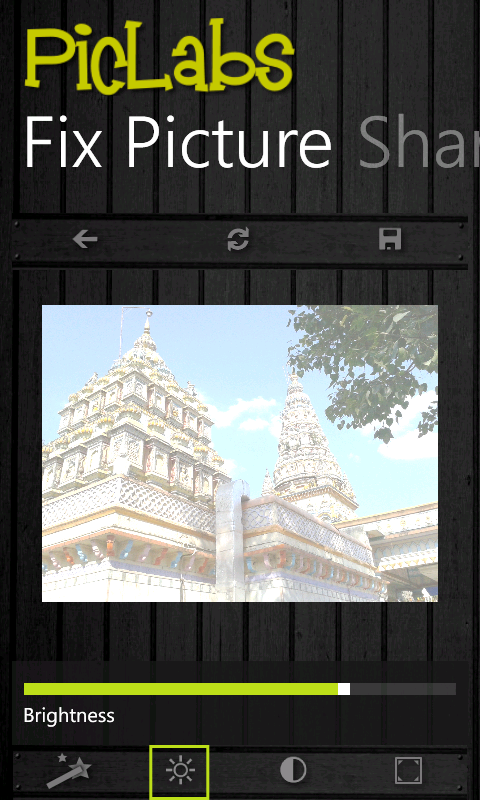
I was busy all these days creating a new application for Windows Phone 7..and I am so happy to announce that it is live! The app is called as PicLabs and is a photo editing tool. You can even post your edited photos on Facebook. Try it from here,
PicLabs on WP7 Market Place or check out the QR code
Subscribe to:
Posts (Atom)